
5. Check Results and Wrap Up
📍 Where you are: Client 5/5 — ① Find · request → ② Workspace · data → ③ Readiness check → ④ Join → ⑤ Wrap-up
Screen: Agent Studio · Other side: the Owner looks at the overall results
🎯 What you do in this step: Read the metrics from your side and end the participation session. A Client sees only its own state; the Owner sees the combined metrics of all participants. You will also tell apart ending a session, stopping participation, and leaving.
1) See my metrics
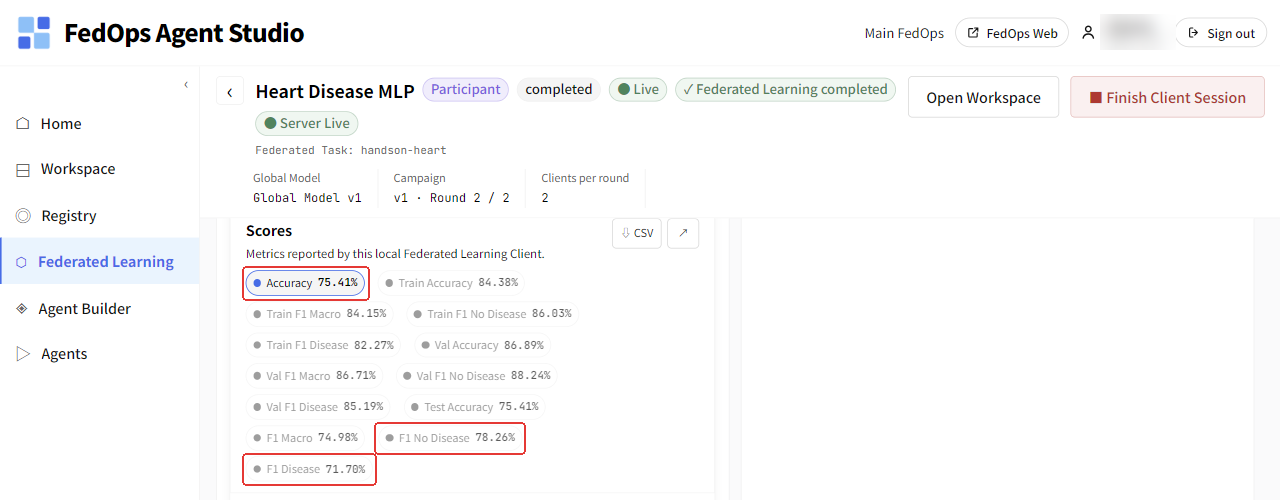
Scroll down the federated learning screen to Scores, the metrics this Client saw. They score the Global Model trained for two rounds together with the Owner (Hungary) on your Cleveland test data: Accuracy 75.41%, F1 Disease 71.70%, F1 No Disease 78.26% (example, 2026-10-20, 303 Cleveland rows). Training is random, so the numbers may differ slightly even with the same data.
| What to read | Meaning |
|---|---|
| Accuracy | Share the Global Model got right on your test data. Cleveland has 54% no heart disease, so it is only meaningful if clearly above 0.54 |
| F1 Disease | How well heart disease patients are caught. The most important metric for this data |
| F1 No Disease | How well patients without heart disease are identified |
These are scores on your own data. Scoring on the Hungarian hospital’s data gives different numbers.
2) End the session
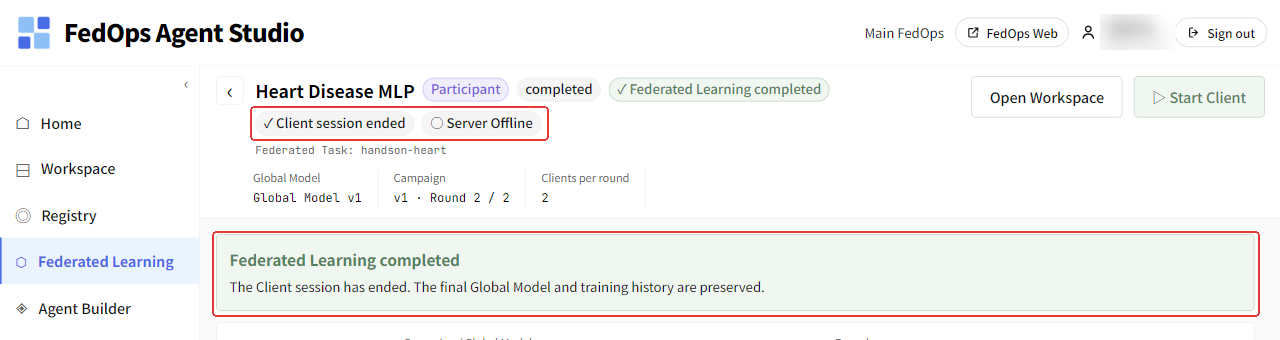
Right after the campaign finishes, completed and the Finish Client Session button appear at the top, and when the server shuts down the session ends automatically (measured on a Windows laptop on 2026-10-20: about 30 seconds after finishing, without clicking Finish). When it ends automatically, the top shows ✓ Client session ended and “The Client session has ended. The final Global Model and training history are preserved.”, and the Finish Client Session button disappears. On this screen there is nothing to click. On the Mac (Owner) in an earlier run, the Finish Client Session button stayed with completed even after the campaign ended. Why the two screens differ (Studio version or role) has not been verified.
- If your version shows the Finish Client Session button, click it once. The screen may stay the same, but the session has ended. Clicking again gives an error (500).
⚙️ Explained — three ways to finish
| Action | When | Result |
|---|---|---|
| Finish Client Session | After the campaign completes | Wraps up this session. Participation records remain (visible after restarting Studio). Depending on the version it may end automatically and the button may not appear |
| Stop Client | To drop out during training | Stops only your PC’s participation. The campaign continues and the server waits for other participants |
| Leave | When you will no longer take part in this Task | Gives up your participation right. To join again, request again from ch. 1. A Task that requires at least one completed run lets you leave only after that condition is met |
In this tutorial you go only as far as ending the session (automatically or with Finish Client Session). When the Owner opens the next campaign, you can take part again with the same Workspace (starting from the chapter 3 check).
📚 Federated learning background — what the Client gains
Without handing over its own data, the Client gets the effect of training on other hospitals’ data. But the Global Model is good for all participants on average, not necessarily the best model for your hospital. If your data differs a lot from other hospitals’, the Global Model may do worse on your test set than a model trained on your data alone. Personalized federated learning (personalized FL) is the research field that narrows this gap.
If the Task is Public, registered Global Models can be downloaded from the Registry. Whether a Client account can use the Global Model as an Agent’s Tool AI has not been verified yet (the Model Use Track assumes the Owner account).
✅ Checklist
- You saw your Accuracy and F1 Disease in Scores
- You confirmed
✓ Client session ended(if the button was there, you clicked Finish Client Session once) - You can explain the difference between Finish, Stop, and Leave
When you are done
- What happened on the Owner’s side → Task Owner Track
- How to plug this model into a service → Model Use Track