
4. Join Federated Learning
📍 Where you are: Client 4/5 — ① Find · request → ② Workspace · data → ③ Readiness check → ④ Join → ⑤ Wrap-up
Screen: Agent Studio · Prerequisite: the Owner started the server (● Server Live)
🎯 What you do in this step: Connect your Studio to the aggregation server and take part in rounds. Every round, you train the Global Model the server sent on your PC with your data (Cleveland) and send only the trained parameters back. This one button triggers the core of this tutorial: “training without moving data”.
- 🖱️ Follow along
- What is happening on your PC now
- ⚙️ Explained — buttons and screen
- ✅ Checklist
- If something goes wrong
- Next
🖱️ Follow along
Check that the card shows ● Server Live. If not, the Owner has not started the server yet. The Task Data row must also show ✓ Local Ready for Start Client to be clickable. When the server starts fresh, the readiness result resets to ○ Check required. Before Start Client, click Check Participation Readiness on the Task Data row again and confirm ✓ Local Ready (about 5 min 40 s, measured on a Windows laptop on 2026-10-20).
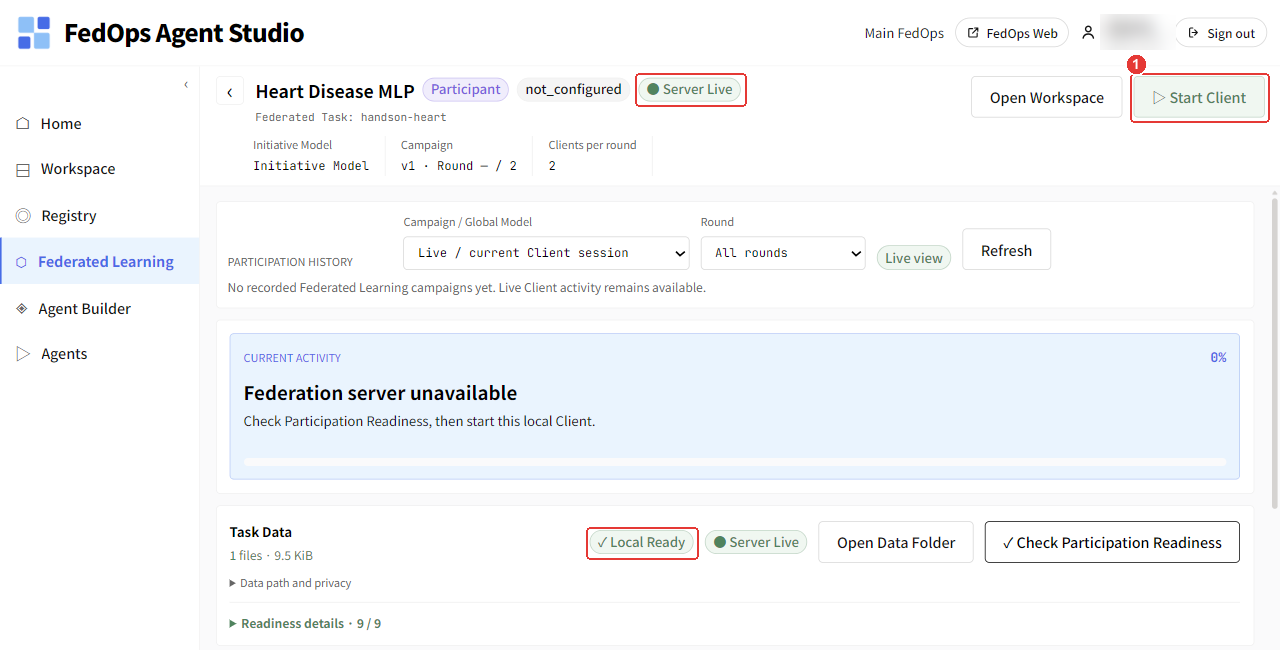
- Click Start Client at the top right.
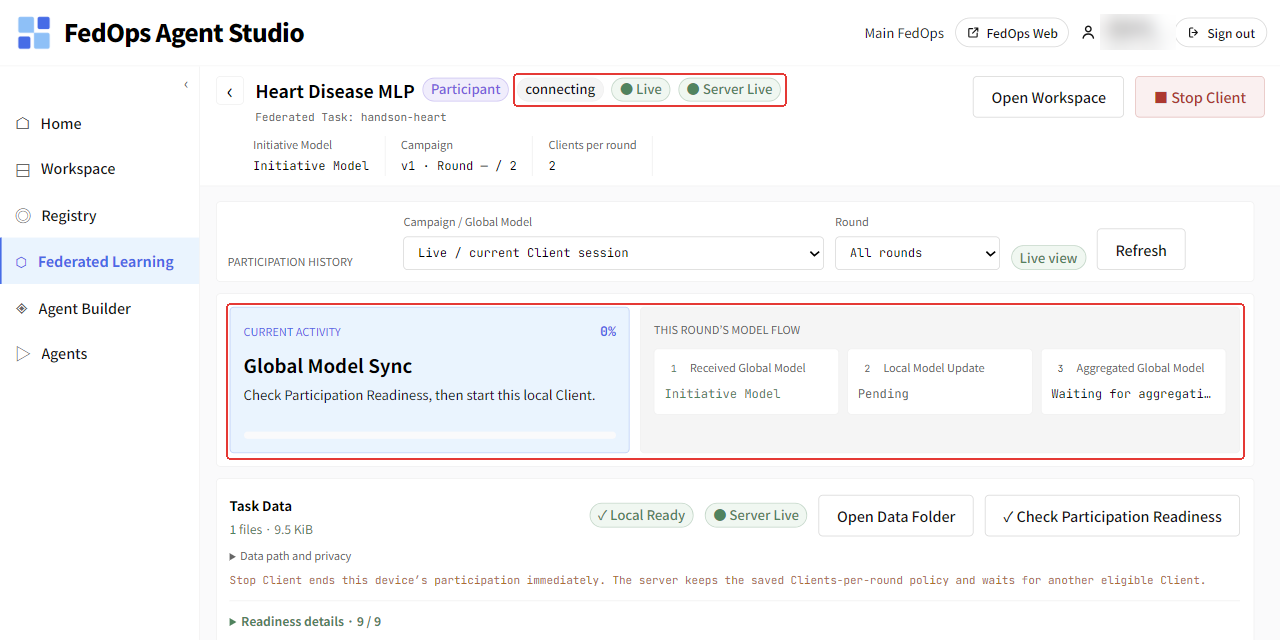
Right after Start Client, the badges show connecting · Live, Current Activity shows Global Model Sync, and Model Flow on the right shows Received Global Model vN → Local Model Update Pending → Waiting for aggregation (the model received is this campaign’s starting model: the Initial Model for the first campaign, the previous Global Model after that). The button changes to Stop Client.
Whoever connects first waits in waiting_round (Current round 1 / 2) until the other connects. The connection count in Console Monitoring can lag several minutes.
In this tutorial, round 1 does not start until both the Owner and you connect (the Owner set Clients per round = 2). The Owner also clicks Start Client in their own Studio. From Start Client to the end took about 2 min 20 s (measured on a Windows laptop on 2026-10-20). About 2 min 10 s of that was the Client getting ready on your PC; once both machines were connected, two rounds of training and aggregation finished in about 5 seconds.
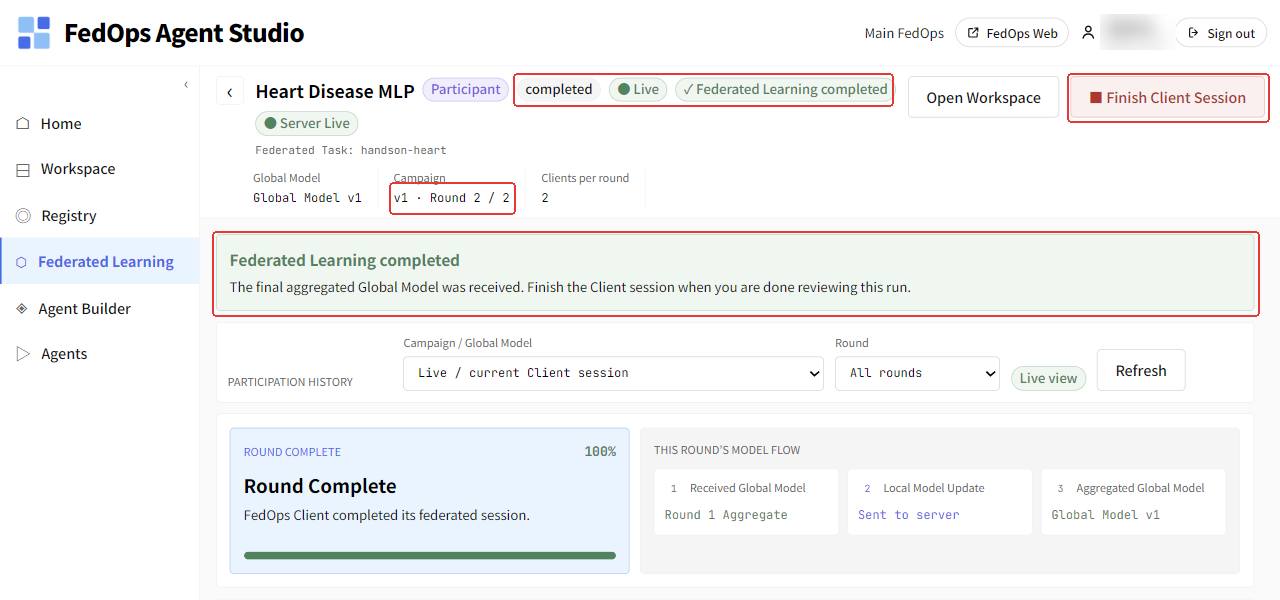
Done when you see ✓ Federated Learning completed and Global Model v1 · v1 · Round 2 / 2 (the version number depends on how many campaigns the Owner ran). Right after finishing, the Finish Client Session button and the notice “The final aggregated Global Model was received. Finish the Client session when you are done reviewing this run.” appear at the top right. The server shuts down by itself when done, and then the screen changes to ✓ Client session ended · Server Offline (chapter 5).
What is happening on your PC now
sequenceDiagram
  participant S as Aggregation server
  participant Me as My Studio
  participant D as My data folder
  S->>Me: Round N: current Global Model parameters
  Me->>D: Read dataset.csv (only inside the PC)
  Me->>Me: Train the received model locally on my data
  Me->>S: Trained parameters + my row count + metrics
  Note over S: Merge everyone's with FedAvg<br/>into a new Global Model
⚙️ Explained — buttons and screen
| Button · item | What it does |
|---|---|
| Start Client | Connects to the server and starts taking part in rounds |
| Stop Client | Stops only your PC’s participation. It does not stop other participants or the whole campaign. The server keeps waiting for the set number of participants |
| Campaign | v1 · Round 1 / 2 — which round of the run producing which Global Model |
| Clients per round | Participants per round set by the Owner |
| Participation History | Past participation records. Choose a campaign and round to view |
- The Client keeps running in the background even if you go to another screen.
- Do not start the Client of the same Task twice. Clients of different Tasks can run at the same time.
- Do not let your PC sleep during training. If you drop out, every other participant waits.
📚 Federated learning background — how much does my contribution count
FedAvg averages each participant’s parameters in proportion to the rows used for training. In this tutorial the Owner (Hungary) has 261 rows and you (Cleveland) have 303, so the Global Model reflects you roughly 46 : 54. The actual weights are computed from the rows each side sets aside for training from dataset.csv (the Client cannot see the Owner’s row count on screen).
| Participant | dataset.csv rows | Approximate share |
|---|---|---|
| Owner (Hungary) | 261 | 46% |
| You (Cleveland) | 303 | 54% |
Your hospital’s patient distribution differs from Hungary’s, so you add cases the Owner could not see alone to the Global Model. On this data, however, combining the two hospitals raises performance only a little (Owner Track ch. 7).
✅ Checklist
- You checked
● Server Liveand clicked Start Client - You saw
✓ Federated Learning completedandRound N / N
If something goes wrong
| Symptom | Fix |
|---|---|
No Server Live | Check that the Owner clicked Start FL server |
| Started but rounds do not begin | Another participant has not connected yet. Match the Owner’s Clients per round with the actual number of participants |
Participation Readiness is missing or outdated | Redo the chapter 3 check (data or code changed, or the server was restarted) |
The Owner says the server is on, but my screen keeps showing Server Offline | Studio’s display can lag several minutes (about 4 minutes in an earlier run). Click Refresh on the federated learning screen |
Start Client fails with [Errno 2] No such file or directory: '…/task-binding.tmp' | Probably clicked while Studio was writing a file right after the check. Click Refresh and click Start Client again |