
FedOps 1.3 Announcement
Federated AI AgentOps — Learn Together, Build Your Own Agent, and Keep Improving
Cognitive Computing Lab, Gachon University
Build your own AI Agent with collaboratively trained models, put it to use, and improve its models together.
FedOps 1.3 is a Federated AI AgentOps platform that connects model development, sharing, federated learning, and Agent use. Institutions and businesses can deploy FedOps on their own infrastructure, while users develop models, participate in training, and use Agents on their local devices.
Here are the key changes you can experience in FedOps 1.3:
- Share and learn together: Discover Tasks and models in the Registry and participate in federated learning while keeping your training data on your own device.
- Build and use your own Agent: Configure Global Models as Tool AI components in Agent Studio, then use your Agent through local chat or a Serving API.
- Operate within your organization: Deploy your own FedOps server with Helm and manage it according to your organization’s access and participation policies.
- Extend to mobile and other devices: Explore the direction of Agent Edge, bringing local Agent use and federated learning participation to more devices.
FedOps has evolved through the following stages.
| Version | Focus | Key Capabilities |
|---|---|---|
| FedOps 1.1 | Establishing the foundation for federated learning operations | Client and Server management, participant selection, training automation, and monitoring |
| FedOps 1.2 | Expanding training capabilities and applications | LLM fine-tuning, configuration and code generation, XAI, clustering and HPO, and multimodal learning |
| FedOps 1.3 | Expanding into Federated AI AgentOps | Registry, Agent Studio, model version management and Agent use, self-hosted deployment, and the direction of Agent Edge |
What Is FedOps?
Data in healthcare, finance, and industry is often distributed across organizations and devices, making it difficult to bring together. Federated Learning (FL) allows participants to train models collaboratively while keeping raw training data on their own devices.
Built on the Flower federated learning framework, FedOps connects Task configuration, Client and Server execution, training monitoring, and result management. Flower provides the communication and aggregation capabilities for federated learning; FedOps helps users prepare and operate the workflow. See the FedOps 1.3 Overview for the overall architecture and user workflows.
FedOps 1.3 extends this workflow to discovering and using collaboratively trained models, then improving them with new data. Federated AI AgentOps describes the lifecycle of using these models as Tool AI components in an Agent, improving selected components through federated learning, and incorporating the results into new Agent versions.
FedOps 1.1 — The Foundation for Federated Learning Operations
FedOps 1.1 established the operational foundation for preparing, running, and monitoring federated learning.
- FL Scalize: Connects models and data to a federated learning environment and helps configure Clients and Servers.
- Manager: Manages Client and Server execution and the training process.
- Contribution Evaluation & Client Selection: Evaluates participant contributions and selects participants for training.
- CI/CD/CFL: Supports continuous learning through deployment and scheduling linked to code repositories.
- Monitoring & Dashboard: Provides visibility into training progress, model updates, participants, and system status.
FedOps 1.2 — Expanding Training Capabilities and Applications
FedOps 1.2 extended this operational foundation with additional training and analysis capabilities.
- Federated LLM Fine-Tuning: Supports distributed fine-tuning and model aggregation using FlowerTune and LoRA.
- Automatic Configuration and Code Generation: Generates federated learning configurations and Server and Client code based on Task settings.
- XAI, Clustering, and HPO: Helps analyze model decisions, group participants, and explore training configurations.
- Multimodal Federated Learning: Introduced the FedMAP aggregation method.
- Wearable Data Applications: Introduced a sleep prediction pipeline using Fitbit data and SleepLSTM.
- Logs and Status Monitoring: Improved visibility into aggregation server creation, execution, termination, and runtime logs.
These capabilities are described in the FedOps 1.2 Announcement and the FedOps 1.2 documentation.
FedOps 1.3 — From Collaboratively Trained Models to Your Own Agent
FedOps 1.3 introduces FedOps Registry and FedOps Agent Studio, connecting model sharing and training participation with Agent creation and use.
We also introduce FedOps Agent Edge as the direction for extending model use and training participation to mobile and other user devices.
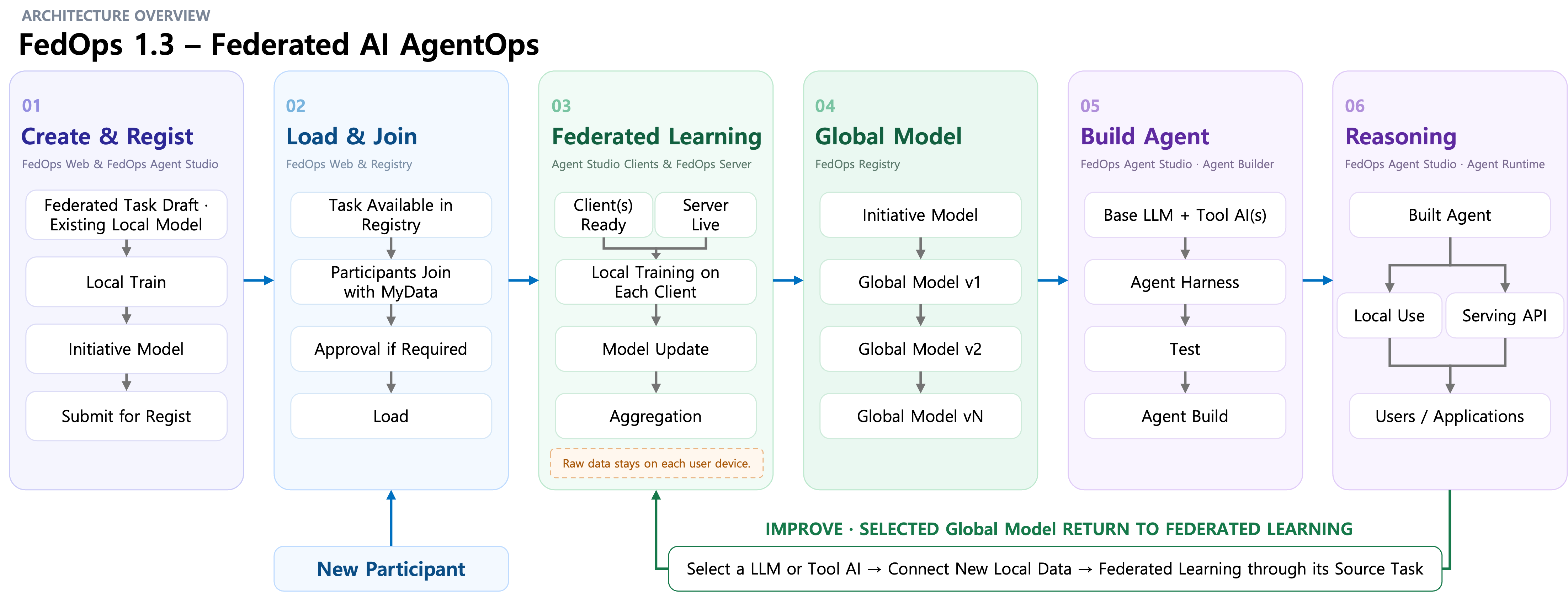
The full workflow connects Task creation and sharing with Agent use and further training of component models. View full-size image
FedOps Registry — Share Tasks and Models, and Learn Together
FedOps Registry is a space to share individually managed Tasks and train models together with other users.
A Task Owner prepares the model code and initial model, checks release readiness, and publishes the Task to the Registry. Other users can discover the Task, review its details, and join according to its participation policy.
A published Release connects the Task’s code, configuration, and model. Authorized Participants open the Release in Agent Studio, prepare their local data and runtime environment, and participate in federated learning.
The Registry manages model versions from the initial model through the Global Models produced by federated learning. Users can review training results and Global Model versions and select the version to use in an Agent.
FedOps Agent Studio — From Model Development to Agent Use in One Workspace
FedOps Agent Studio is an application that connects model development, federated learning participation, and Agent creation and execution on the user’s local device.
Within one Workspace, users can:
- Develop Task code, connect local data, and prepare a Python environment.
- Train an initial model locally, run readiness checks, and submit a Release Candidate.
- Open Tasks published in the Registry and participate in federated learning.
- Review their own Client’s training progress and execution history.
- Build an Agent by configuring a Base LLM, Tool AI models, and an Agent Harness.
- Use the Agent through local chat or connect it to their own applications and services through a Serving API.
FedOps Web handles Task publication, participation management, training Campaigns, and aggregation server operations. Agent Studio runs training and Agents on each user’s device, sending model updates rather than raw training data to the aggregation server during federated learning.
Federated AI AgentOps — Use Agents and Continuously Improve Their Component Models
You can build your own Federated AI Agent by configuring Global Models from the Registry as Tool AI components. Select classification, prediction, or analysis models produced through federated learning, then combine them with a Base LLM and an Agent Harness to create an Agent for your purpose.
For example, an Agent could combine a language model that answers health-related questions with a health prediction model used as a Tool. The language model interacts with the user, calls the Tool AI when needed, and incorporates its predictions into the response. Multiple models can be configured as Tools to extend what the Agent can do.
Once built, the Agent can be used directly through local chat in FedOps Agent Studio or connected to your own applications and services through a Serving API. Collaboratively trained models become part of an Agent suited to your needs.
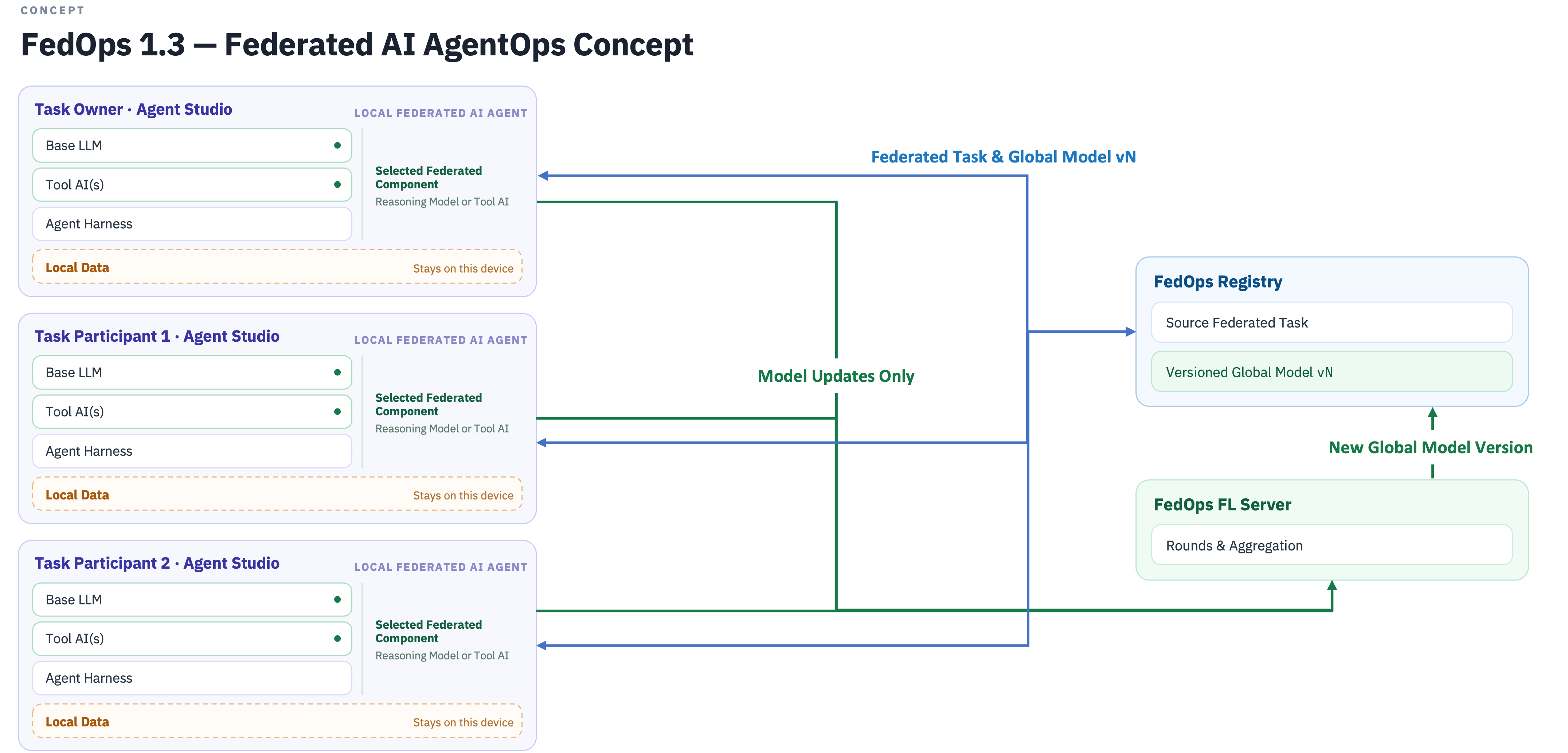
Raw training data stays on each device, while model updates are aggregated into a new Global Model. Users select model versions from the Registry for use in their own Agents. View full-size image
To improve the Agent, select a component model that needs further training and return to its federated learning Task. Participants train on their own local data, and their updates are aggregated into a new Global Model. You can then review the new version in the Registry, test it, and incorporate it into a new Agent Build.
Each Agent Build pins its selected model versions and configuration, making it possible to trace which models it uses. A new Global Model does not automatically change an existing Agent. Users review the results and choose which version to apply when updating their Agent.
Select Global Models → Configure Tool AI → Build Your Agent → Use It Locally or in a Service → Improve Component Models through Federated Learning → Build a New Agent Version
This lifecycle—using collaboratively trained models in your own Agent and collaboratively improving selected component models—is Federated AI AgentOps.
FedOps Agent Edge — Extending to Mobile and Other User Devices
FedOps Agent Edge aims to provide a mobile and on-device environment for using Registry models in local Agents and participating in federated learning with local data. While Agent Studio covers model development through Agent creation, Agent Edge focuses on using published models and participating in training. Its goal is to let users select models supported on their devices and join training on their connected FedOps server without setting up a development environment themselves.
Agent Edge is introduced as a direction for mobile and on-device expansion. It aims to connect the use of Global Models prepared for a device as Tool AI components with the ability to select improved versions from federated learning and apply them to an Agent. Supported devices and the scope of execution and training will be announced separately as implementation and validation progress.
Run FedOps on Your Organization’s Infrastructure — AWS, KakaoCloud, and On-Premises
FedOps is a Federated AI AgentOps platform that institutions, businesses, and research labs can deploy and operate on their own infrastructure. With network access and authentication configured to match organizational policies, teams can share Tasks and models, run federated learning, and use trained models in Agents within an environment restricted to their own members.
The FedOps server can be installed on Kubernetes using Helm. Deployments can be configured for on-premises servers and local Kubernetes environments, as well as public clouds such as KakaoCloud and AWS, with networking and storage adapted to each environment. The current installation guide covers single-node and multi-node configurations for on-premises and KakaoCloud deployments.
Users can select which FedOps server to connect to in Agent Studio, access that server’s Registry, and participate in federated learning. They can develop and use models through their organization’s internal server or another collaboration server they are authorized to access. Agent Edge is also being developed toward connecting to a FedOps server selected by the user.
Getting Started
If you are new to FedOps, start with Agent Studio installation and setup. Then follow the guide that matches your goal:
- To develop and share a model: Create a New Task — From Task Creation to Registry Publication
- To join a published Task: Participant: Join & FL
- To build and use an Agent: Agent Builder & Serving
Thanks to Our Contributors
We thank the members of the Cognitive Computing Lab at Gachon University who contributed to the development and research behind FedOps 1.3.
- InSeo Song (z8086486@gachon.ac.kr)
- Jinyong Jeong (wlsdyd5373@gachon.ac.kr)
- MinHyck Jung (bvnm0121@gachon.ac.kr)
- MinSoo Cho (whalstn21@gachon.ac.kr)
- SHI JINGYAO (11490800573@gachon.ac.kr)
Advised by Prof. KangYoon Lee (keylee@gachon.ac.kr)
Turn collaboratively trained models into your own Agent, and keep improving them through further learning. FedOps 1.3 brings this lifecycle together through Federated AI AgentOps.