
FedOps Registry
From publishing and discovering federated learning Tasks to training together with the same Release. This post introduces why we built the FedOps Registry and how it works.
Federated learning enables multiple participants working on the same problem to train a shared model using their own local data and produce a single Global Model. Before they can train together, however, they first need a way to find one another.
Anyone who wants to participate in federated learning needs to know which Tasks are available, what data and models those Tasks use, and what needs to be prepared before joining.
Even after finding a Task, another problem remains. Every participant in the Task must start training with the same code and configuration and the same baseline model. If one participant uses an older version of the code while another trains with a configuration that is still being modified, it becomes difficult to trust the aggregated result.
After training is complete, users also need a way to view the resulting Global Models by version and download the version they need.
To address these needs, we built the FedOps Registry.
FedOps Registry is a place where users can discover published Tasks, understand their training context and participation requirements, request participation, and use the Global Models produced through federated learning.
Task Owners publish validated code, configuration, and models as a single Release, and participants join federated learning based on that Release.
Today, participants join from a Silo environment, such as an institutional server or workstation, using Agent Studio. Support for Mobile participation from personal devices such as smartphones is in preparation, and the Registry is already designed to show which environments each Task supports.
Why We Need a Registry
In FedOps 1.2, Tasks and aggregation servers could already be managed through the Web interface. However, participants still had to prepare the code and execution environment used for actual training on their own.
The process of introducing a Task to other users and bringing them into the training process also depended heavily on manual coordination between the Owner and participants. The same was true for verifying whether every participant was actually training with the same version of the code and model.
In FedOps 1.3, we reorganized the process of publishing a Task and connecting participants into a single workflow.

The Task Owner completes and validates the code, configuration, and model in Agent Studio, submits them as a Release, and then publishes that Release through FedOps Web.
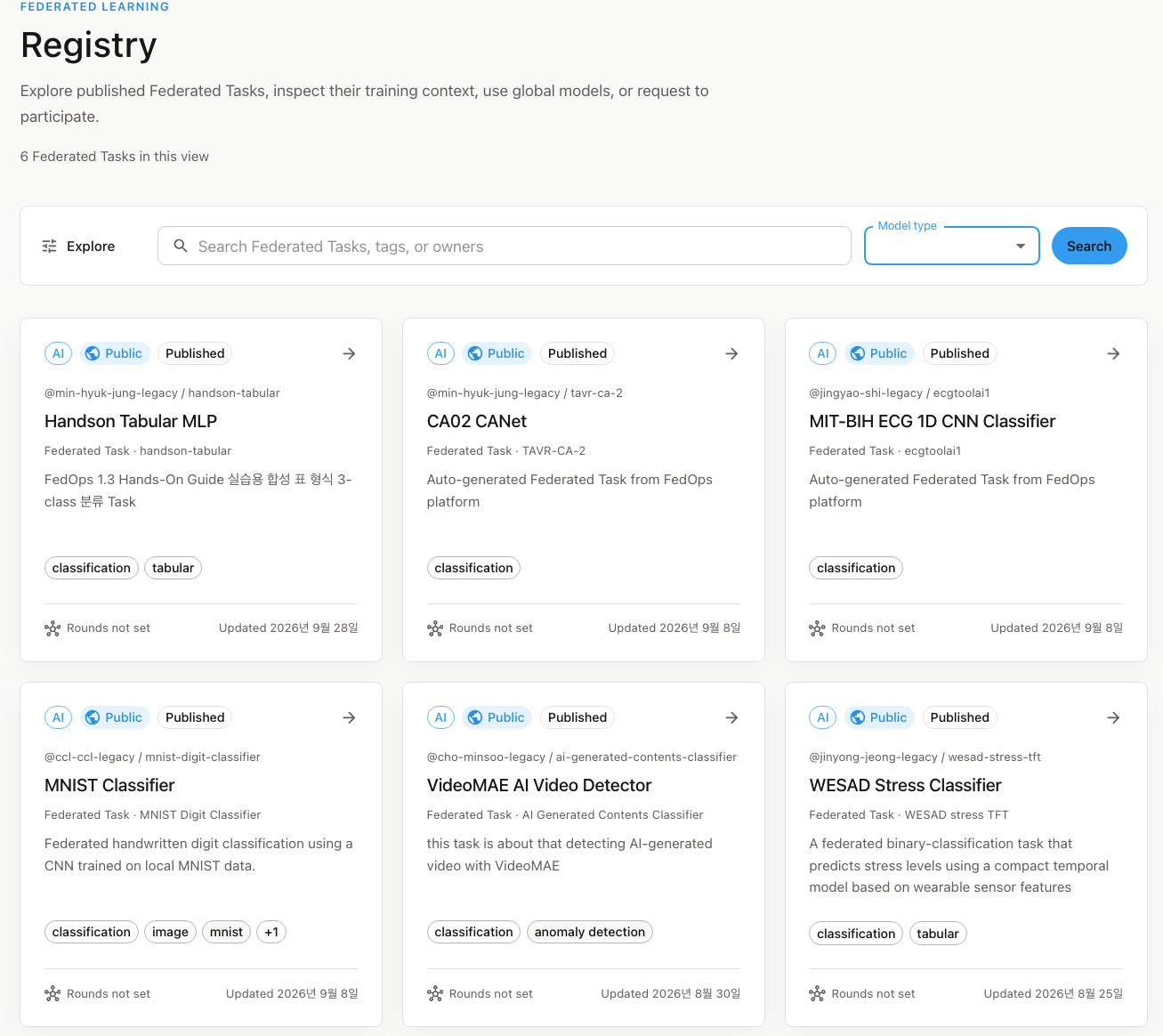
Once published, the Release appears in the Registry as a Task Card. Other users can discover the Task through the Registry and request to participate.
After participation is approved, participants receive the same Release published by the Owner and start training in Agent Studio.
What is published through the Registry includes the documents describing the Task, the code and configuration required for training, and the model. The participant’s original training data is never uploaded to the Registry or FedOps Web. It remains on the participant’s own server or device.
Finding a Task to Join in the Registry
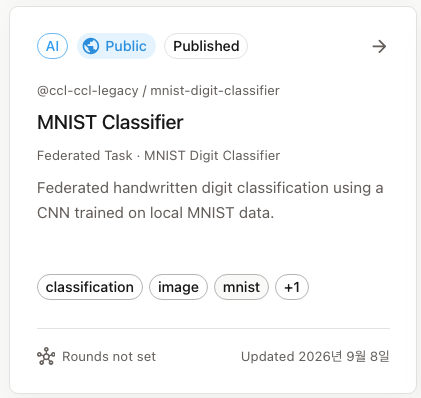
Each Task has a Registry ID. This value is specified when the Task is created and serves both as a public identifier for distinguishing the Task in the Registry and as its address. Users can search for published Tasks in the Registry using this identifier.
Each Task Card displays both the Model name and the Task name associated with that model. The Primary Model name is finalized by the Owner during the Release Readiness process.
Supported Clients: Silo Today, Mobile Coming Soon
There is more than one type of environment from which users can participate in federated learning.
- A Silo environment is designed for organizations such as hospitals, institutions, and research laboratories that participate using their own servers or workstations. Silo participants connect their Python execution environment and local data through Agent Studio.
- A Mobile (OnDevice) environment is intended for participation directly from personal devices such as smartphones. Mobile support is currently in preparation.
Because training runs differently in each environment, the clients that can join a Task may differ depending on the environment for which its Release was prepared. The Registry therefore displays the supported clients on each Task Card.
| Label | Meaning |
|---|---|
| Agent Studio | The Task can be joined from a Silo environment using Agent Studio. The currently published Release is built on a validated Federated Task Baseline and is compatible with the federated learning execution model used by Agent Studio. |
| OnDevice | Coming soon. Mobile participation is in preparation and is not yet available for any Task. It will be enabled only for Releases that pass a validated contract for on-device execution and federated learning participation. |
This allows users to determine directly from the Registry whether a Task can be joined from their environment.
However, the client label is compatibility information for Task discovery. Even when a supported client is shown, the participant must still complete the same participation approval and readiness checks before training begins.
Federated Task Card
Opening a Task displays its Federated Task Card. The Task Card is organized into the following sections.
| Section | What You Can Check |
|---|---|
| Federated Task Card | Task description written by the Owner (README.md from the Release), Primary Model, Framework, Owner, published Release, and participation policy |
| Training | Training configuration and training context |
| Files & versions | Files included in the Release, file preview and download, and Global Model versions |
| Data & Setup | Data and execution environment requirements that must be prepared before participation |
| Community & usage | Number of approved participants, Global Model download count, and recent activity |
| My Participation | Status of your participation request and approval |
The description shown on the Task Card comes directly from the README.md included by the Owner in the Release. This allows the documentation required to understand a Task to be managed together with its code. When a new Release is published, the description can therefore evolve together with that Release.
Publishing a Task to the Registry
Publishing a Task to the Registry involves both Agent Studio and FedOps Web.
- In FedOps Web, create a Federated Task as a Draft and configure its Registry ID, category, visibility, and participation policy.
- In Agent Studio, complete the Task code, pass Local Train and Release Readiness, and submit the code, configuration, and Initial Model as a Release Candidate.
- In Registry Release on FedOps Web, review the submitted Candidate and publish it.
A Release that passes Release Readiness on a validated Federated Task Baseline is displayed in the Registry as compatible with Agent Studio.
It is important to distinguish between Task visibility and Release publishing. Even if a Task is configured as Public, it does not appear in the Registry until a Release has been published. Only Releases explicitly published by the Owner become available through the Registry.
The Owner can also configure how participation works. A Task may require Owner approval before a participant can join, allow users to participate immediately after requesting access, or temporarily disable new participation altogether.
Files included in the Release and Global Models can be downloaded by the Owner and approved participants.
Training with the Same Release
The unit published through the Registry is not an individual file. It is a Release.
A Release is a validated bundle of source code, configuration, and models prepared by the Owner. The files shown in the Task Card and under Files & versions all come from the same Release. Because participants do not select the latest version of each file independently, they can use the exact combination of code, configuration, and models validated by the Owner.
Even if the Owner improves the Task and submits a new Release Candidate, the currently published Release is not immediately overwritten. Participants continue using the existing published Release. Only when the Owner publishes the new Candidate does the public Release switch to the new version as a single unit. This prevents Tasks that are still being modified or have not yet completed validation from being exposed through the Registry.
The Release is not delivered only to participants. The aggregation server also receives and runs the same Release and Initial Model. In other words, participant clients and the aggregation server begin training from the same baseline.
When an approved participant starts joining from a client, the following information is provided:
- Published Release
- Initial Model
- Execution contract
- Current aggregation server address
The participant connects their local data, verifies that the environment is ready for participation, and then starts training. Silo participants run the FL Client through Agent Studio.
What the Registry Protects Behind the Scenes
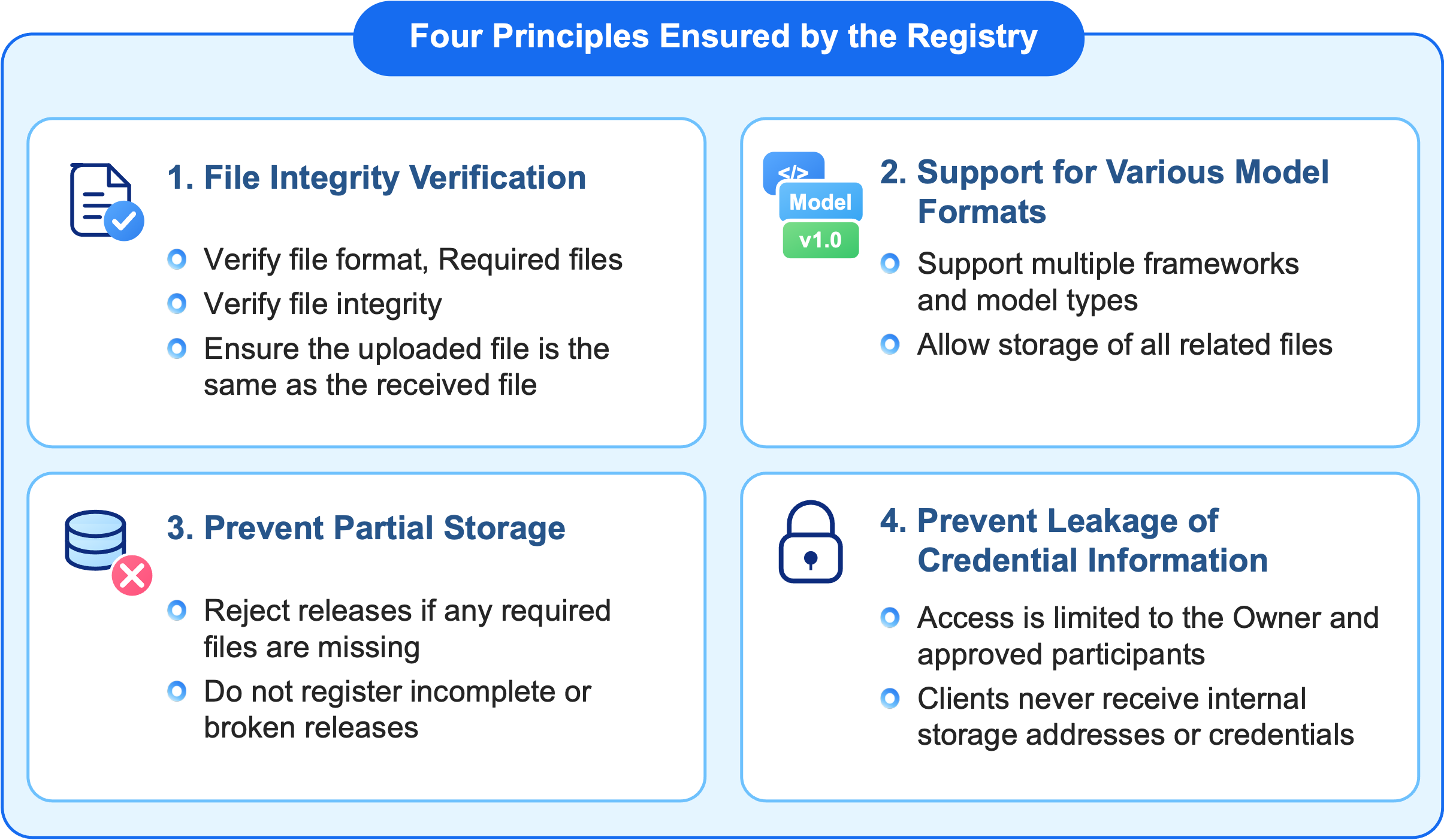
Behind the Task Cards and files visible in the Registry is a dedicated storage layer for Releases and model files. This storage layer does more than simply store files. It ensures that Releases distributed through the Registry remain consistent and trustworthy.
It verifies that the file you receive is the same file that was uploaded
When Agent Studio submits a Release, FedOps Web verifies the user’s permissions, file sizes and hashes, required files, and Release Readiness results before storing the Release in the Registry.
Immediately after storage is complete, the files are downloaded again and verified to ensure that their sizes and SHA-256 hashes match the originals. Only after all validations succeed is the Release Candidate recorded as available for use.
Participant clients perform the same validation again after downloading a Release.
It does not restrict model files to a specific format
Federated learning Tasks can use different model file formats depending on the Framework and execution environment.
The Registry is therefore designed to store the different types of files and models required by a Task without restricting them to a particular file extension.
It does not leave partially stored Releases behind
A single Release may contain multiple files. If even one file fails validation or an error occurs during the storage process, the entire Release storage operation is canceled.
This prevents incomplete Releases containing only a subset of the required files from remaining in the Registry.
It does not expose storage credentials to users
Credentials required to access Registry storage are managed exclusively by FedOps Web. Clients do not access the underlying storage system directly. Instead, authenticated users receive only the Releases and models they are authorized to access through FedOps Web.
Viewing and Using Global Models by Version
As federated learning progresses and training results from multiple participants are aggregated, new Global Model versions are created.
Under Files & versions, users can view published Global Model versions, compare them, and download the version they need.
Under Community & usage, users can check information such as the number of approved participants, Global Model download counts, and recent activity. Task Owners can see how many users are participating in their Task and how much the resulting Global Models are being used. Users considering whether to participate can also use this information to understand whether the Task is actively being operated.
A Global Model does not have to end its lifecycle as a downloadable model file. In the Agent Builder within Agent Studio, users can select a Global Model as a Tool AI Model and connect it to their own Agent.
This creates a flow in which a Task discovered through the Registry becomes a Global Model through federated learning, and that model can then be connected to an Agent and used in an actual service.
The full workflow connected by the Registry is:
Create Task → Submit Release → Publish → Discover in Registry → Request & Approve Participation → Federated Learning with the Same Release → Publish Global Model Versions → Use the Model & Prepare the Next Release
Getting Started with FedOps Registry
FedOps Registry is available directly from the FedOps Console.
Browse the published Tasks, and when you find one you want to train with, check the client compatibility label on the Task Card to confirm that it supports your environment before requesting participation. If you want to publish your own Task, prepare a Release in Agent Studio and publish it through FedOps Web.
For more detailed instructions, refer to the related documentation.
- To publish a new Task, see Create a New Task.
- To join an existing Task and start federated learning, see Participant: Join & FL.